

Every provider. One dashboard.
Track AI costs across your AI stack and see where spend is happening and who is responsible for it.
- Spend refreshed every 15 minutes across the major providers
- One standard view across providers, teams and workflows, with no manual reconciliation
- Spend attributed to the team and workflow that made each call
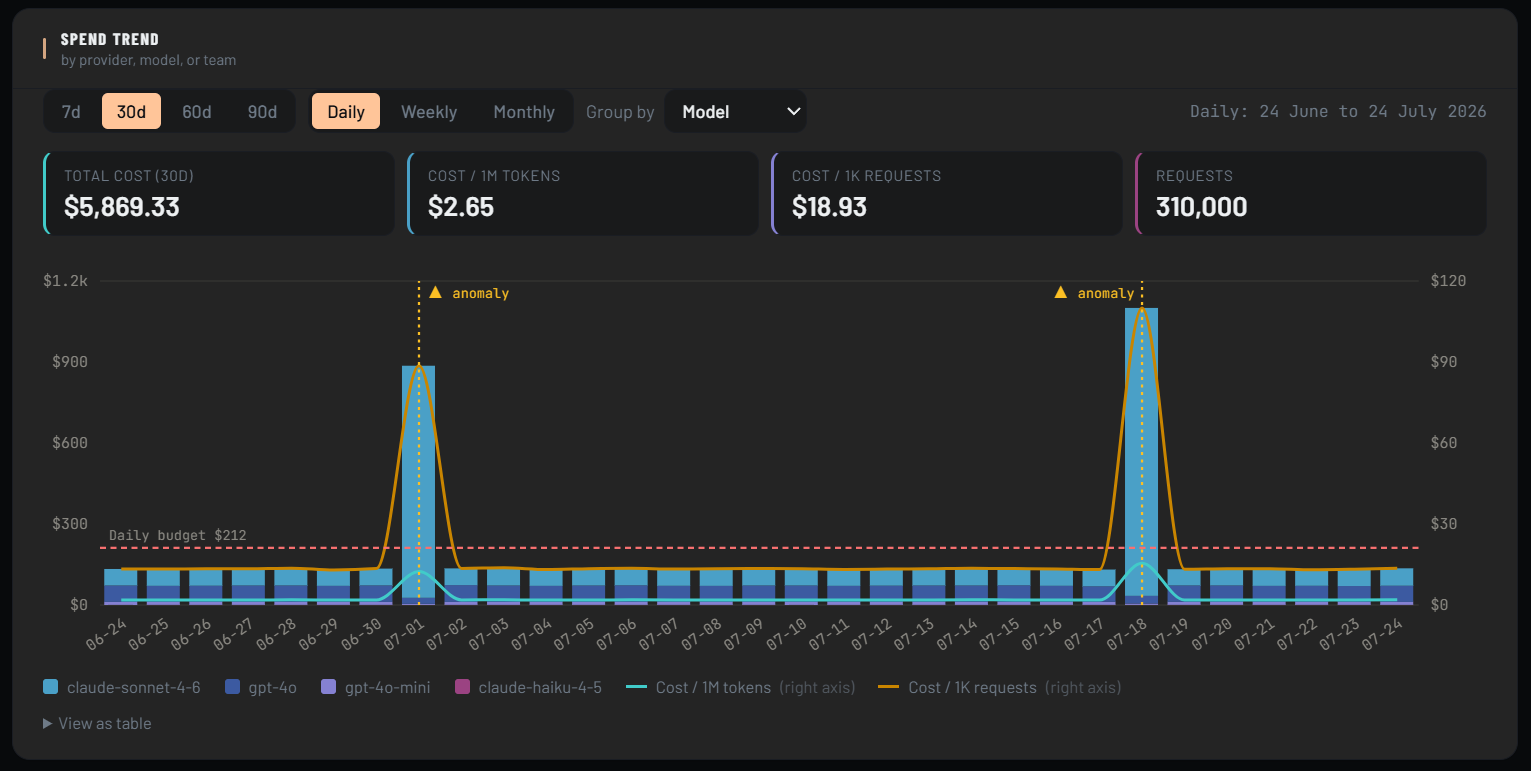
Spend trend, by provider or model, with automatic anomaly flagging, live in the SAVI console.
Your AI spend is spread across providers. Your reporting doesn't have to be.
As AI use grows, so does complexity. Costs sit with different providers, invoices arrive on different schedules, and reports are scattered. One view lets finance track costs, see trends and agree with each team who owns what.
Invoices arrive after the spend
Provider invoices land weeks after the spend happens. SAVI shows spend as it builds, so you can act before the month closes.
Providers price in different units
Some price per token, some per thousand tokens, and some add a fee per request. Putting them side by side by hand is slow and easy to get wrong.
Ownership changes behaviour
When AI spend belongs to no one, no one changes how they use it. Attributing spend to teams gives each owner a number to manage.
See spend as it builds
SAVI refreshes cost data every 15 minutes, not once a month with the invoice. When a new model goes live, its cost shows up quickly. Spikes are spotted early, so you can act before the invoice arrives.
Swipe to see all columns →
Example rates, blended 30/70 input and output. Check current provider pricing.
Compare one number, not six invoices.
Providers charge in different ways: per million tokens, per request, with different rates for input and output. SAVI converts each model to one cost per 1K tokens, using a blended input and output mix, so finance, engineering and procurement look at the same number.
- One unit for every provider and model, with no spreadsheet
- Pricing changes flagged, so finance hears about them before the bill
- Export the comparison for vendor conversations, with dated rates
Know which team owns each dollar of AI spend.
Finance gets the cost allocation it has asked for since the first AI invoice. SAVI attributes each AI call to the team and workflow set in your SDK settings, with no tagging project. Engineering managers can see their own team's spend.
- Every call attributed to a team and workflow from your SDK settings
- Works with your existing setup, with no change to how teams build or deploy
- Spend exported by team in a standard cost format, for chargeback
Example data. Team spend this month, $47.2K of $58.5K total budget
Views available in the console
Give finance a view it can use
Your CFO can see AI costs the way cloud costs are seen: attributed to teams, with a trend and a budget to compare against.
Export spend by team in a standard cost format for your finance tools.
Can you answer what AI cost you yesterday?
6 questions. Answer honestly.
Can you see your total AI spend across all providers right now, not on last month's report?
Do you know which team generated the largest AI invoice last month, down to the workflow?
Can you see which provider gives you the best value for the same task, without a manual comparison?
If a new model were deployed this afternoon, would you see its cost impact soon after?
Can your CFO see AI costs without asking engineering for a report?
Can you attribute your AI spend to a budget owner, with no unallocated costs?
This checks one slice of your AI estate. Take the full AI Cost Ownership Assessment →
Your AI gap score
Answer to begin
Complete all questions to see your result
See your whole AI spend in one view.
SAVI puts AI spend from the major providers in one view, attributed to teams. Book a demo to see it on your data.